COMMODORE 128 / LIVE AIS

Real ships.
Live data.And a Commodore 128.

A live view of the harbour, running on a classic computer. AIS4CBM decodes vessel reports and brings them to the Commodore’s 80-column display.

A working C128. Recorded vessels. No installation.

THE GRAPHICS VIEWERABERDEEN, SCOTLAND
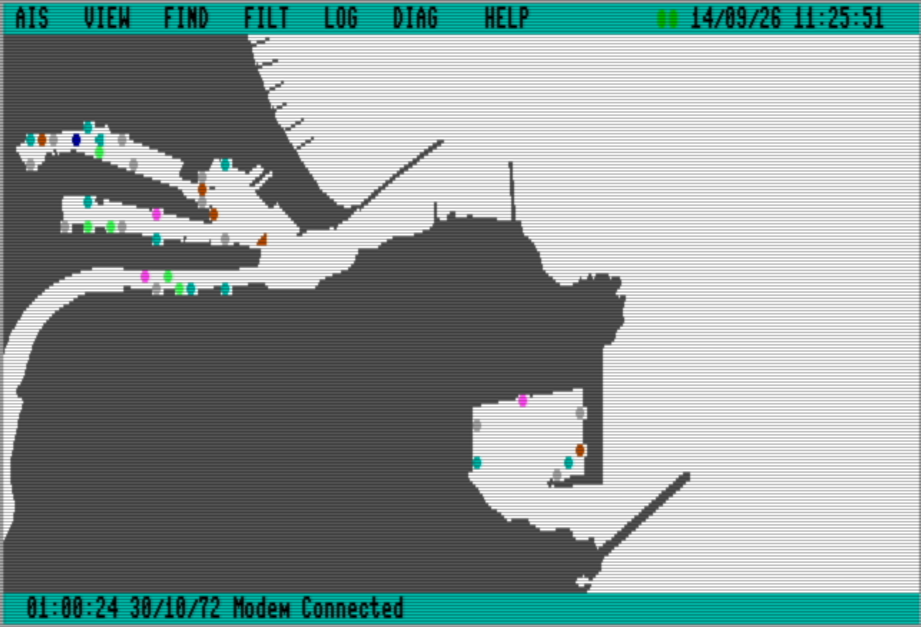
AIS4CBM graphics viewer showing coloured vessel symbols across Aberdeen harbour, with its menu bar and connected-modem status.
Live vessel positions on a BASIC 8 harbour map.September 2026
8502Assembly at the core
640 × 200VDC graphics display
1,000Vessel registry capacity
Two viewsGraphics and text interfaces

01 / MEET THE DATA

What is AIS?

Vessels telling us who and where they are. A stream of real-world information that a Commodore can turn into a view of the harbour.

AIS means Automatic Identification System. Equipped vessels broadcast digital reports over marine VHF radio, allowing other vessels and shore stations to receive information about their identity, position and movement.

Different reports carry different parts of the picture. Position reports contain latitude, longitude, speed and course. Other reports provide a vessel’s name, callsign, type or voyage information. Software brings those reports together using the vessel’s MMSI, its nine-digit Maritime Mobile Service Identity.

In AIS4CBM, a receiver or feed supplies the reports to the C128 through its serial interface. They arrive as NMEA sentences: structured text lines carrying an encoded AIS payload. The receiver or upstream service handles the radio side; the Commodore extracts the fields, updates the vessel record and presents the result as text or a map.

A PROJECT THAT CAN GROW WITH YOU

Why is AIS a good start for a Commodore project?

AIS gives us a concrete goal: turn an incoming report into something we can understand on screen. A first version can decode one recorded position report and print its vessel identity and speed. Each later step adds a useful capability.

Start with one message.

A known sample gives you fields to check before adding a live feed. Bit masks, shifts, byte order and character conversion all contribute to a visible result.

Make text useful first.

A vessel list can come before a chart or mouse interface. Machine language can receive and decode the reports while BASIC formats values and controls the display.

Build towards a live harbour.

Add report types, retain vessel records, filter updates and draw a map. A busy feed gives buffering, scheduling and memory use a practical purpose.

The complete AIS4CBM application grew to need expanded storage and graphics support. The starting point remains simple: receive some bytes, understand their meaning and show the result. The small tutorials explain the techniques along the way.

Learn more: IMO’s introduction to AIS · US Coast Guard: AIS report fields. To connect a feed, see the hardware guide or VICE setup.

02 / THE GRAPHICS VIEWER

A harbour full of information.

The graphics viewer puts AIS reports on a map, ready to explore, using BASIC 8 for its VDC graphics.

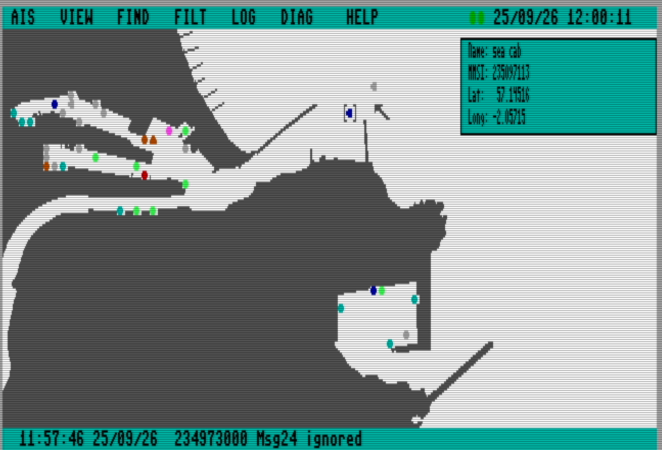
AIS4CBM showing Aberdeen harbour with contrast brackets around one vessel and a right-hand panel for its name, MMSI, latitude and longitude.
One vessel selected on the Aberdeen map. Screenshot from VICE, 25 September 2026.

SINGLE-VESSEL SELECTION

A closer look, right on the map.

Single-click a vessel to see its name, MMSI and coordinates in a compact side panel. A contrasting marker highlights your selection as incoming reports update its details.

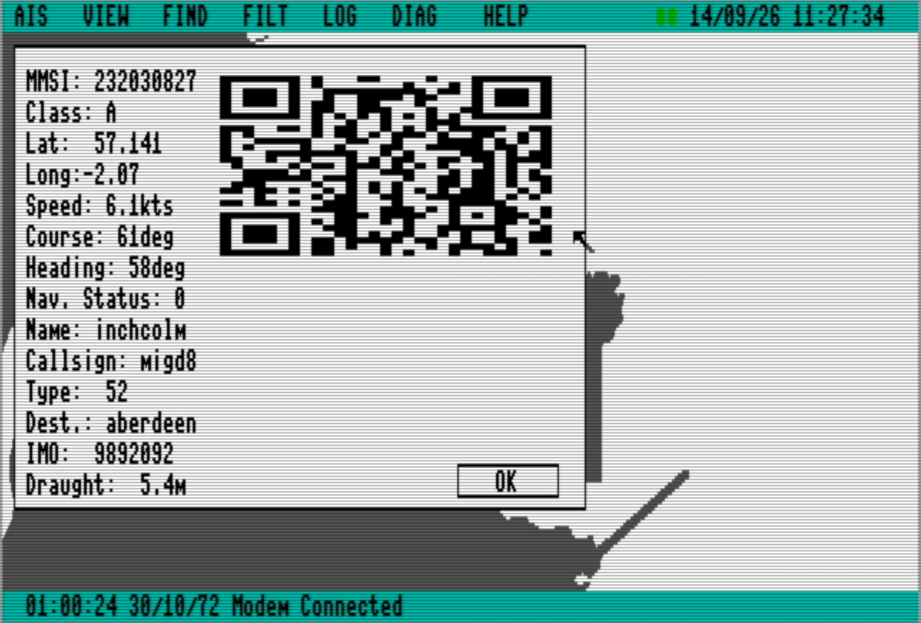
Double-click a vessel to open its full details and QR code.

Vessel details for Inchcolm showing its MMSI, speed, course, heading, destination, draught and a QR code.
01

From a vessel to its details

Inspect identity, position, speed, heading and voyage information. A QR code connects the selected vessel to its MarineTraffic page.

QR generation is based on Martin's implementation from The 8 Bit Theory.

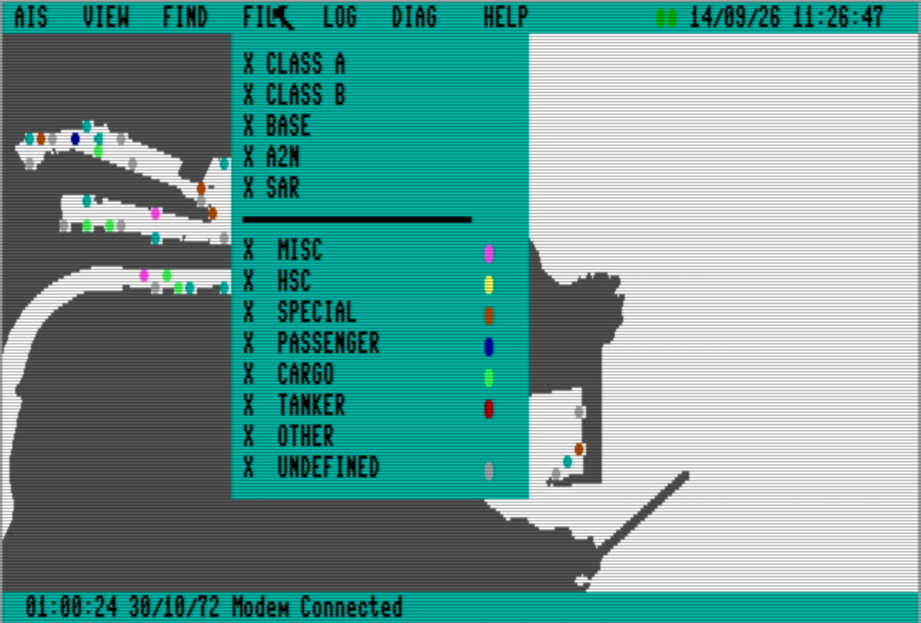
The graphics filter menu with vessel classes and colour-coded categories including passenger, cargo and tanker.

Choose what appears

Filter vessel classes and categories, with colour and direction making the map easier to read.

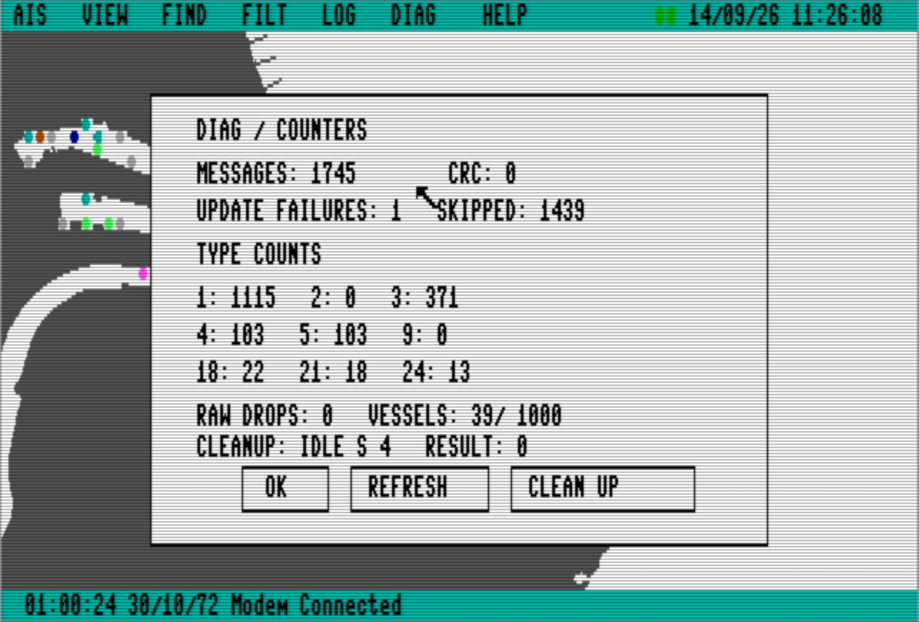
AIS4CBM diagnostics showing message totals, CRC errors, per-type counts, raw drops and registry usage.

See what is happening underneath

Built-in counters expose the incoming message mix, decoding checks and vessel-registry usage.

03 / THE TEXT INTERFACE

The same data.
A different perspective.

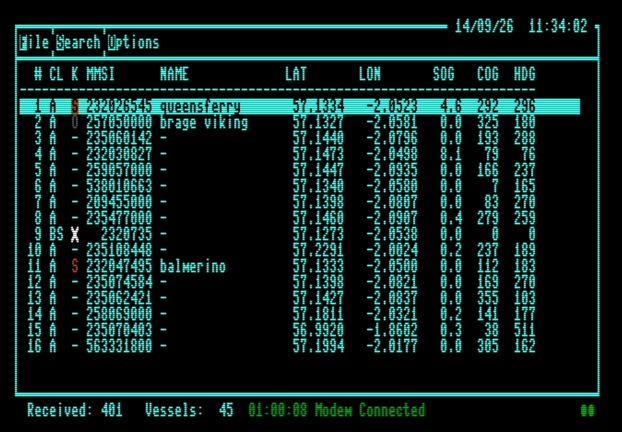
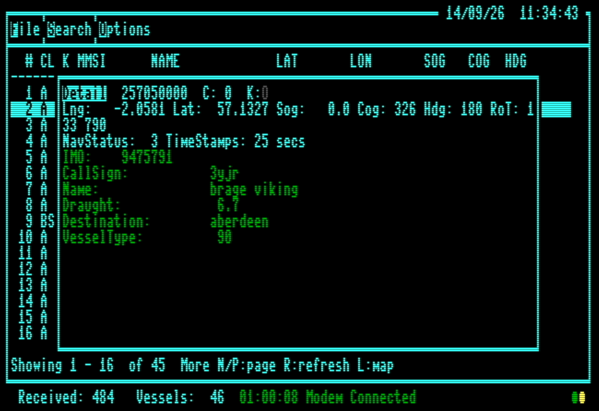
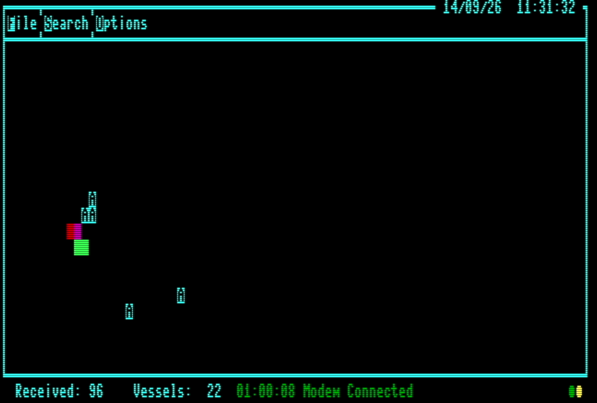
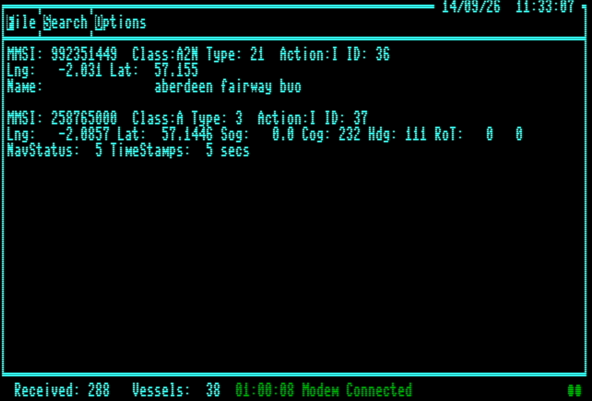
The BASIC 7 interface presents the AIS stream as an 80-column text scope, message view and vessel browser. It provides a compact way to follow reports and inspect individual records.

04 / INSIDE THE PROJECT

Built around the 128.

The machine-language runtime handles reception, decoding and vessel storage. BASIC 7 and BASIC 8 provide two interfaces to that common engine. We build the assembly code with Kick Assembler.

  1. 01AIS feed

    NMEA vessel reports

  2. 02Serial input

    SwiftLink-compatible interface, using an adapted SwiftLib driver by Craig Bruce

  3. 038502 runtime

    Decode, store and filter

  4. 04VDC display

    Harbour map or text view

A registry built for live traffic

Up to 1,000 vessels are tracked in a Bank 1 registry. Fixed slots in the RAM Expansion Unit hold their positional and static data, while aging and reclaimed-slot reuse keep storage available.

More than position reports

The decoder handles Class A and Class B vessels, base stations, aids to navigation and SAR aircraft. Vessel reports can include identity, callsign, ship type and voyage details.

THE GRAPHICS TOOLKIT

Powered by BASIC 8.

BASIC 8 is a graphics extension for the Commodore 128’s built-in BASIC 7. It adds drawing, text, brushes and windows for the 80-column VDC display. These are the building blocks of our 640 × 200 graphics viewer.

Why we use it

BASIC 8 gives us the drawing operations to display harbour maps, place vessel symbols and build menus and information windows. It keeps the interface readable and easy to develop in BASIC, while our 8502 assembly runtime handles serial reception, AIS decoding and vessel storage.

In AIS4CBM, BASIC 8 uses buffers in the REU for maps, fonts, vessel brushes and saved graphics. The 512 KiB REU minimum therefore covers both the AIS engine and its BASIC 8 graphics buffers. The viewer also requires 64 KiB of VDC video RAM for its display screens. Both memory requirements apply to this graphics setup.

The project’s current disk build includes the BASIC 8 runtime and boot files used by the graphics viewer. The BASIC 7 text interface provides an alternative view of the same AIS data.

FROM THE SOURCE CODE

Small tutorials.

One problem, a few lines of code, and the idea behind them. Explore how AIS4CBM works, with snippets and direct links to the source. Assembly excerpts use Kick Assembler syntax.

01 / BASIC + MACHINE LANGUAGE

An event loop with BASIC WAIT

A shared byte connects the machine-language runtime to the BASIC interface. See how flags, masks and one WAIT statement bring the two together.

Read the tutorial
BASIC 7.0 / THE CORE IDEA
MK=PEEK(MP)
WAIT WF,MK,MS
WM=PEEK(WF) AND MK

Choose. Wait. Handle.

02 / INTEGERS + FLOATING POINT

From an AIS integer to FAC

The decoder has four integer bytes. BASIC needs a floating-point value. Follow the conversion in fac.asm, from the leading bit to the mantissa and exponent.

Read the tutorial
8502 ASSEMBLY / THE CORE IDEA
123456789
  → mantissa EB 79 A2 A0
  → exponent 9B

Find the bit. Shift. Set the scale.

03 / SHARING THE CPU

One loop, two languages: IGONE

An endless ML loop would keep BASIC from running. See how a statement hook gives the ML runtime its turn, while shared events coordinate it with the BASIC interface.

Read the tutorial
BASIC + ML / THE CORE IDEA
BASIC statement
  → IGONE → ML service
  → next BASIC statement

One loop. A turn for each language.

04 / GETTING VALUES FROM ML

Ask ML, get a BASIC value: USR

WAIT tells BASIC when to act. USR asks for a vessel field. Follow the selector into ML and see how numbers and names return as values BASIC can use.

Read the tutorial
BASIC + ML / AFTER LOCKING THE VESSEL
MM=USR(2)
NM$=USR(34)

Choose a field. Get its value.

05 / KICK ASSEMBLER DATA STRUCTURES

Describe the fields, reuse the decoder

Structures, hashtables and lists turn AIS field descriptions into compact decoder tables. Choose a field and follow its bits in the interactive example, then explore how the same idea applies to aircraft.

Read and try the tutorial
KICK ASSEMBLER / FROM DESCRIPTION TO BYTES
aField(10,2,uInt)
  → descriptor 0A 02 01
  → shared field handler

Describe. Assemble. Decode.

BUILD WITH AIS4CBM

Your interface.
The same AIS engine.

Want to use the machine-language runtime in your own Commodore 128 application? The API exposes vessel data, notifications, filters and runtime services. Your frontend can be written in BASIC or another language.

Explore the Developer API

A CALLING CONTRACT

Calls in. AIS data out.

Find the entry address, supply the registers, and use the returned result. The reference explains vessel transactions, shared events and the C128 runtime requirements.

Application → API → ML runtime

05 / REAL HARDWARE

The machine behind the map.

AIS4CBM also runs on a real Commodore 128. Here is the computer itself, and the expansion hardware that brings memory and live AIS data to it.

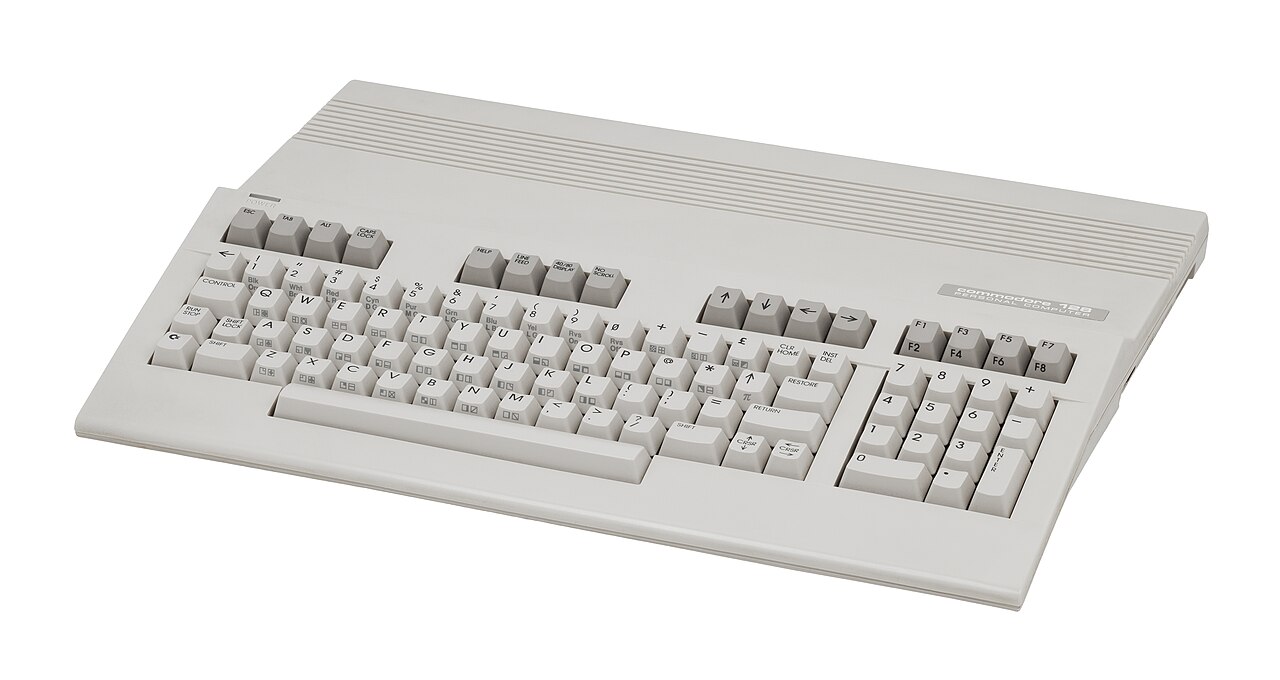
A real beige Commodore 128 computer, showing its full keyboard, separate numeric keypad, cursor keys and function keys.
Commodore 128Photo: Evan-Amos / Wikimedia Commons, CC BY-SA 3.0. Source thumbnail; no further changes.

Start with the C128.

Use the machine’s 80-column VDC output with a compatible display and 64 KiB of VDC video RAM. Add the AIS4CBM disk, at least 512 KiB of REU memory, and a SwiftLink-compatible connection to the live feed.

Recommended: Ultimate-II+. It combines REU emulation, disk-image support and a SwiftLink-compatible network modem in one cartridge.

The GGLABS GLINK232 is a separate serial option for an external network modem or compatible AIS receiver.

REU memory and VDC memory: both are required

REU: at least 512 KiB. A physical 512 KiB REU or an Ultimate-II+ with REU emulation provides the expansion memory needed for AIS vessel storage and BASIC 8 graphics buffers. Larger REUs work with the same build; 512 KiB is sufficient for all 1,000 vessel slots and the graphics assets.

VDC: 64 KiB of video RAM. AIS4CBM’s BASIC 8 graphics viewer also needs this dedicated display memory. A machine with only 16 KiB of VDC RAM needs a VDC memory upgrade. Adding an REU or an Ultimate-II+ does not increase the VDC’s own RAM.

The flat/wedge C128 and plastic-case C128D shipped with 16 KiB of VDC RAM and need an upgrade unless one is already fitted. The metal-case C128DCR has 64 KiB as standard. See the VDC upgrade maker’s model notes.

RECOMMENDED / MEMORY + SERIAL + DISK

Ultimate-II+

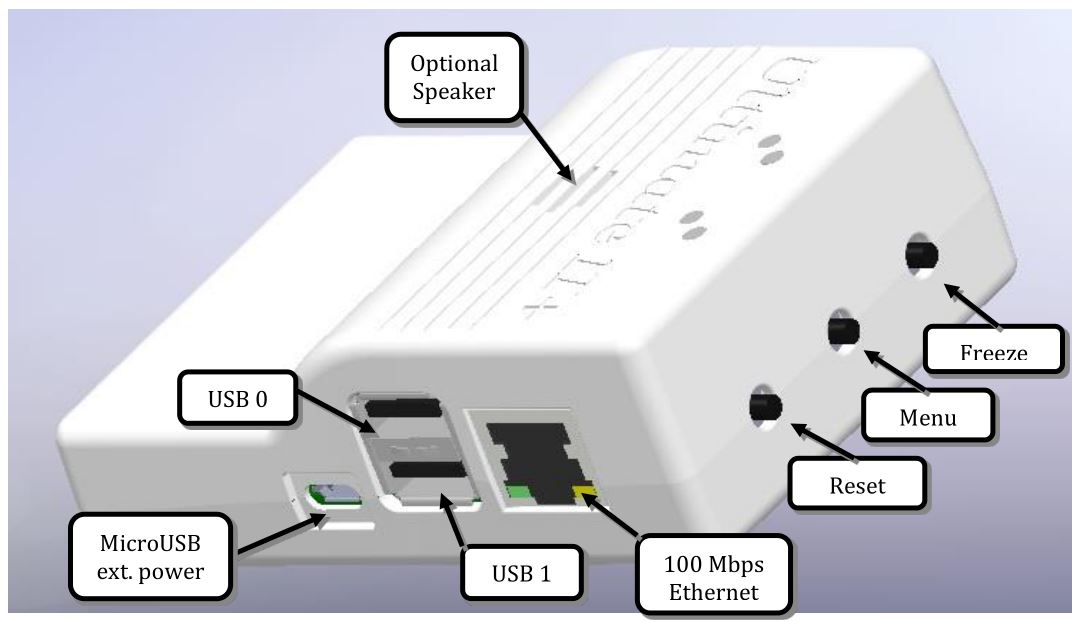
An Ultimate-II+ cartridge with the Ethernet port, USB ports and menu, reset and freeze buttons labelled in the manufacturer's photograph.
Image: Ultimate documentation. Original labels retained.

Enable its REU emulation with 512 KiB or more and use firmware with ACIA modem support. The built-in modem connects the SwiftLink-compatible serial interface to the Ethernet port, so this setup provides both the expansion memory and network connection AIS4CBM needs.

The C128 still needs 64 KiB of VDC video RAM. Use the AIS4CBM serial settings: $DE00, NMI and 38400 baud.

Ultimate-II+ guide

ALTERNATIVE / SERIAL INTERFACE

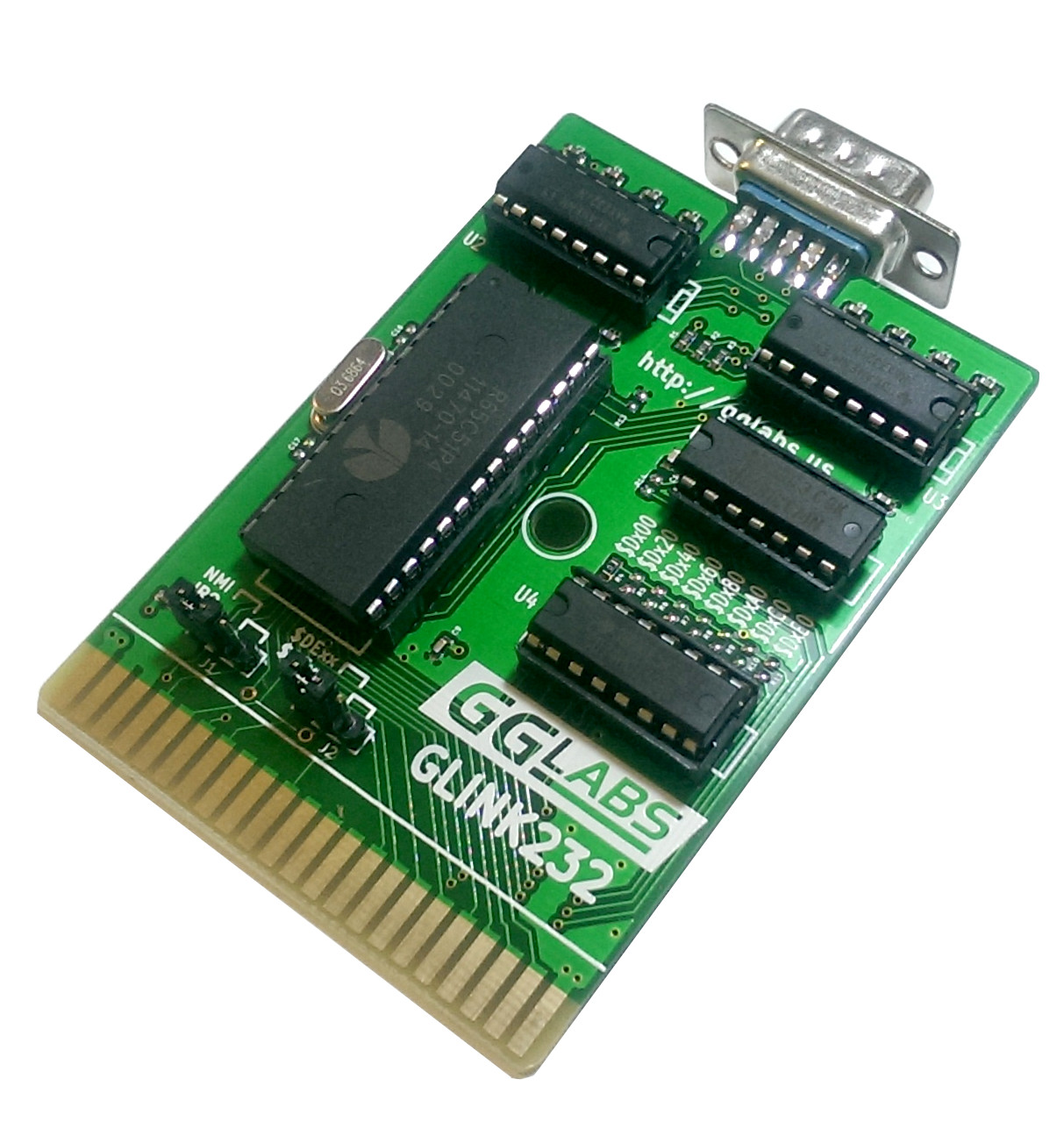
The green GGLABS GLINK232 cartridge board, showing its 9-pin serial connector, ACIA chip, configuration jumpers and gold expansion-port connector.
GLINK232 A03 photo: GGLABS / Gabriele Gorla.

A dedicated SwiftLink-compatible RS-232 cartridge for the C64 and C128. Configure it for $DE00 and NMI; AIS4CBM uses 38400 baud.

This option also needs an external serial-to-network modem or compatible AIS receiver and a 512 KiB or larger REU. Sharing the expansion port with another cartridge requires a compatible cartridge expander and non-conflicting settings. The hardware wizard covers these connection choices.

GLINK232 hardware details

EXPANSION MEMORY / 512 KiB MINIMUM

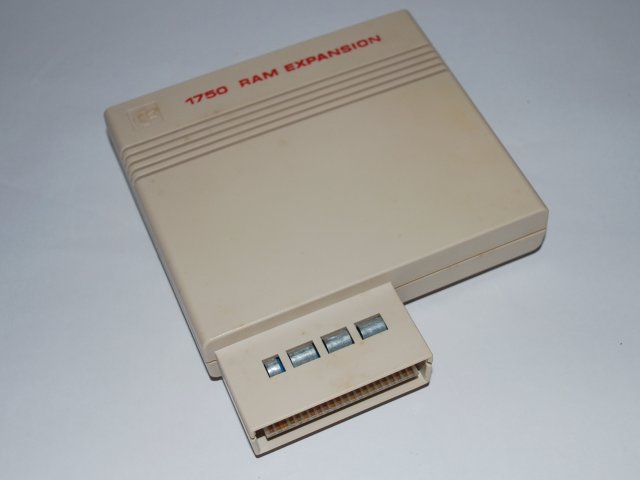
Commodore 1750 REU

A beige Commodore 1750 RAM Expansion Unit, showing its labelled case and expansion-port connector.
Photo: ReplayResources.

A physical 512 KiB REU, such as the Commodore 1750, meets the current build’s expansion-memory requirement. It holds both the AIS vessel data and BASIC 8 graphics buffers, with space for all 1,000 vessel slots.

You still need a SwiftLink-compatible connection to the live feed and 64 KiB of VDC video RAM. If the serial interface also uses the expansion port, use a compatible cartridge expander with non-conflicting settings.

Configure REU memory in VICE

DISPLAY MEMORY / FOR 16 KiB MACHINES

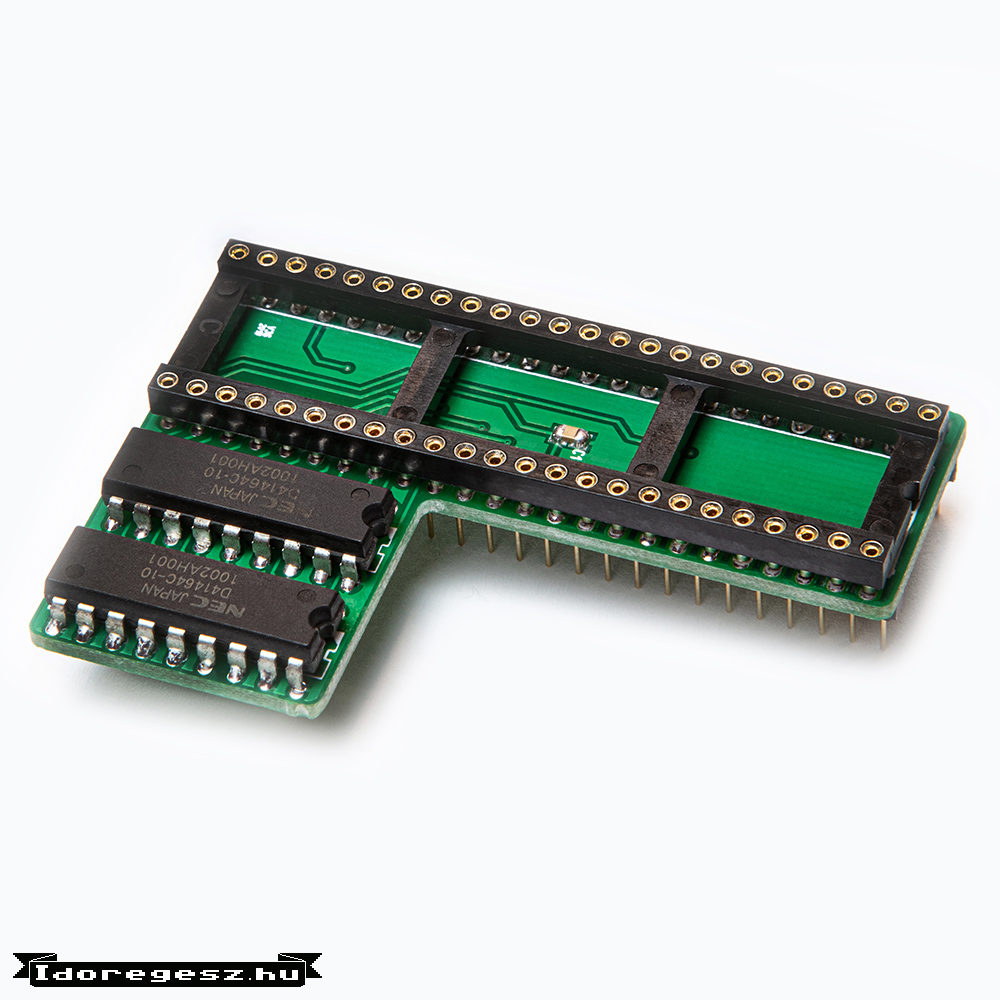
64 KiB VDC upgrade

An Idoregesz.hu VDC memory upgrade board with a long socket for the video controller and two RAM chips.
Image: Idoregesz.hu. Original watermark retained.

This upgrade provides the 64 KiB of VDC video RAM needed by AIS4CBM’s BASIC 8 graphics viewer. It is intended for the flat/wedge C128 and plastic-case C128D, which originally have only 16 KiB. The metal-case C128DCR already has 64 KiB.

VDC RAM is the display’s own memory; the 512 KiB REU requirement still applies. Check the maker’s compatibility and fitting instructions for your machine.

VDC upgrade details and fitting instructions

06 / FROM THE RECORDINGS

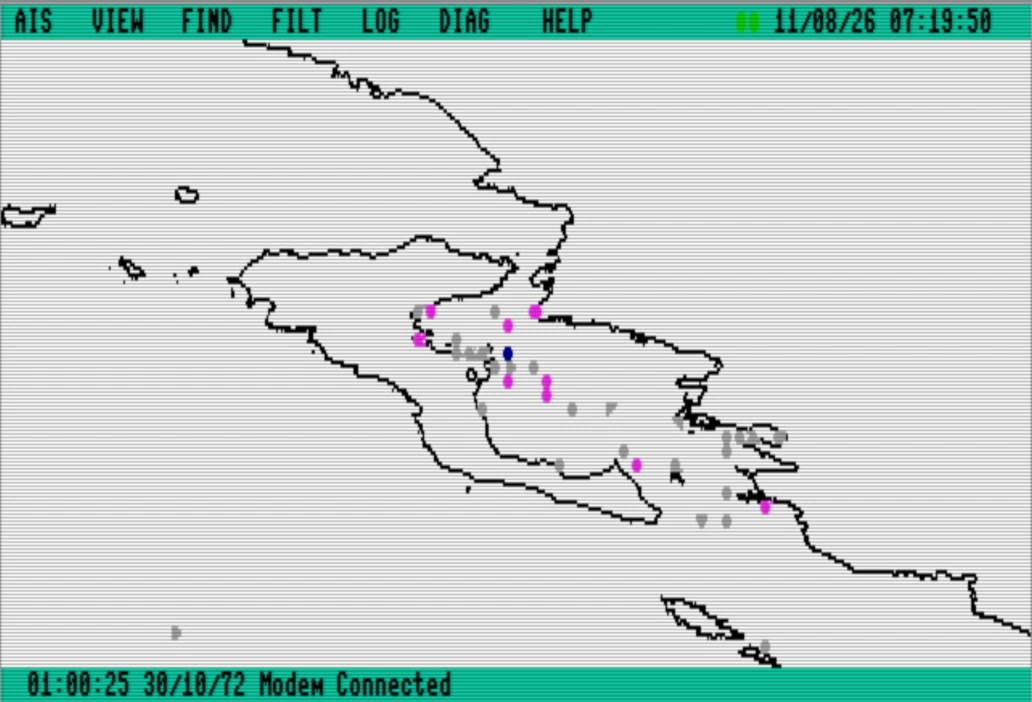
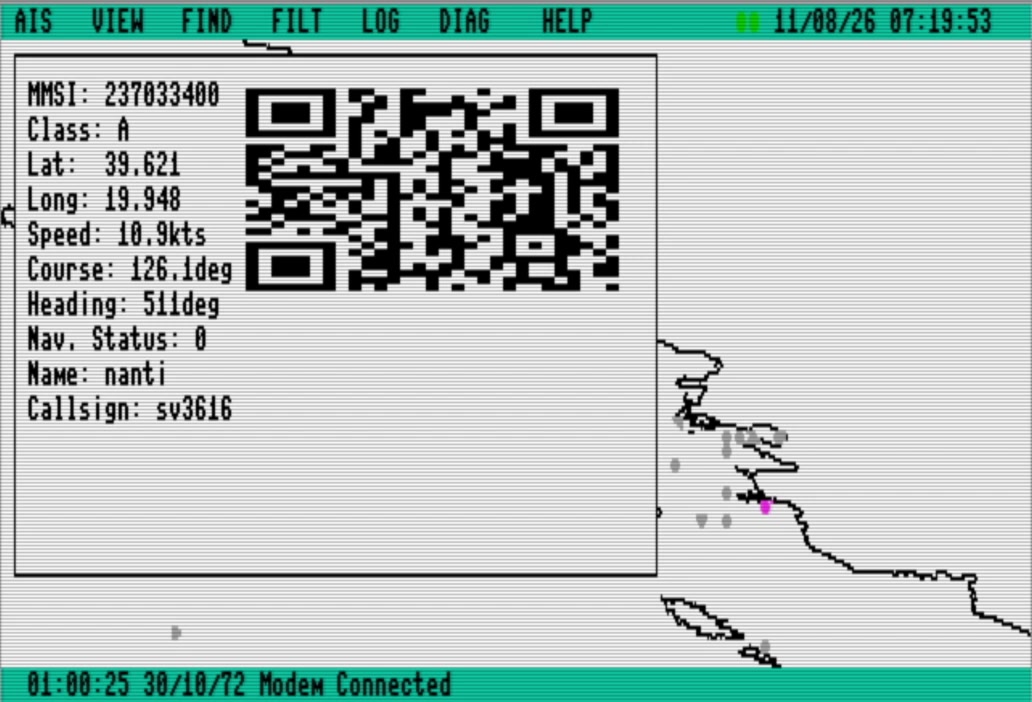
A view of Corfu.

Two moments from the project recording of 11 August 2026. These show an earlier build plotting vessels around Corfu and opening a vessel’s details.

08 / ACKNOWLEDGEMENTS

Credits and thanks.

AIS4CBM builds on code, tools and documentation shared by the Commodore community. These contributions help bring live AIS to the C128.

SWIFTLINK SERIAL DRIVER

Craig Bruce / SwiftLib

The serial driver is based on Craig Bruce's SwiftLink/Turbo-232 library, SwiftLib v0.91, converted to KickAssembler and adapted for AIS4CBM. It provides the foundation for receiving the AIS stream through a SwiftLink-compatible interface.

Craig released the original library into the public domain. The source credits him and dates version 0.91 to 21 August 2000.

ASSEMBLER AND BUILD TOOLS

Mads Nielsen / Kick Assembler

AIS4CBM's machine-language engine is assembled with Kick Assembler, created by Mads Nielsen. Its structures, lists, hashtables and scripting let us describe AIS fields and generate compact tables for the shared decoder. Its disk directives also package the BASIC 8 disk image from the assembled code, existing compiled BASIC programs and graphics assets.

DEVELOPMENT TOOLS AND SUPPORT

Arthur Jordison / CBM prg Studio

Special thanks to Arthur Jordison, creator of CBM prg Studio, for his generous help with AIS4CBM. He responded to bug reports and adapted the tools to support the project's BASIC compilation needs.

Thanks also to the creators of BASIC 8, the VICE team, and Zimmers' Commodore archive for the graphics tools, emulation and preserved software used to explore this project. Hardware photographs are credited alongside each image.

Development note

I started AIS4CBM in 2020 and developed it independently into a working system. More recently, I used ChatGPT to help investigate bugs, speed up debugging and refine the implementation. The project's direction and responsibility for the final code remain mine.

This presentation website was also created with assistance from ChatGPT.

Try AIS4CBM Download latest AIS4CBM Watch the broadcast

AIS4CBM · a C128 in your browser

AIS4CBM live broadcast